The Rocknet Lab — proof, not just a claim.
This isn't a hobby project sitting off to the side of my career — it's a self-built three-node virtualization cluster that puts the same skills carrier-grade network engineering demands to work at home: hardware planning, network design, systems administration, and production hosting. It also happens to be running the page you're reading right now.
The Cluster
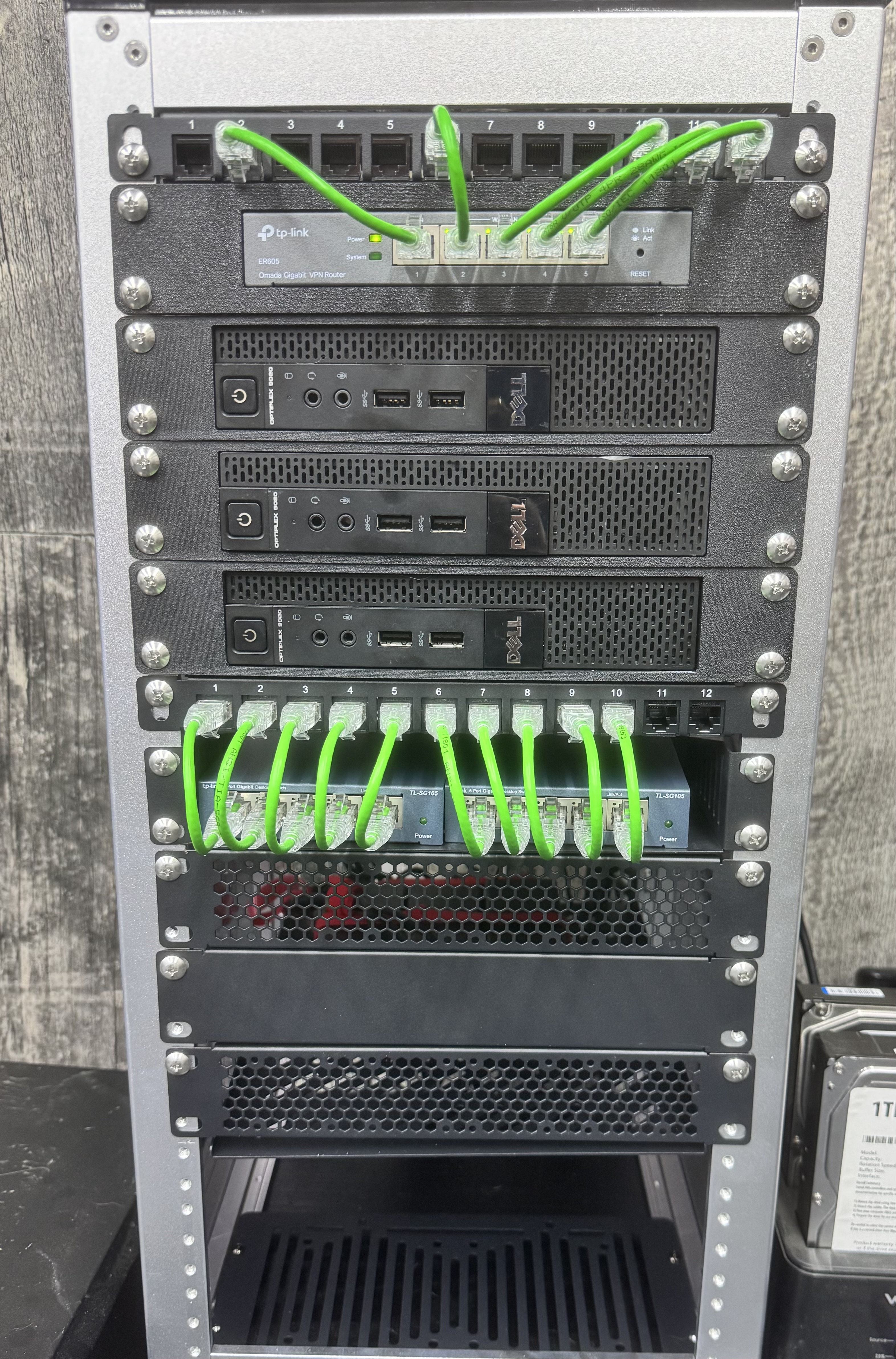
Rocknet is a three-node Proxmox VE cluster running across three Dell OptiPlex 9020 machines, named PVEServer, PVE2, and PVE3. Clustering the nodes — rather than running three standalone hypervisors — means shared management, the ability to migrate workloads between hosts, and hands-on experience with the same high-availability principles that carrier networks are built on, just at a much smaller scale.
All routing for the lab runs through a single TP-Link ER605 — one router, doing the job, kept simple on purpose. Cabling from the nodes lands on a 12-port patch panel and fans out through two TP-Link TL-SG105 five-port switches, so any run can be re-patched without re-terminating a cable.
Explore the Lab
The lab has two halves, each with its own page: the compute and hosting side, and the networking side that runs on top of it. Both carry live data pulled from the cluster itself.
Data Center & Virtualization
The three-node Proxmox cluster up close: a full topology diagram, what every box does, how a web request and a monitoring scrape move through the system, the guests it runs, and how this site is hosted with no inbound ports open.
SDN & Routing
A VXLAN overlay built with Proxmox SDN and Terraform, and a four-router service-provider-style lab on top of it running IS-IS, BFD, iBGP with a route reflector and eBGP with policy, plus a live dashboard of every router and link.
Hardware
Building It with AI in the Loop
The claude-code container on PVE3 isn't just for show — it's Claude Code, and I use it as an agentic dev environment to help build out parts of this lab. That doesn't make me hands-off. I still have to know how Ansible modules, the Proxmox API, Terraform providers, and nginx configs actually work well enough to tell it what to build, review what comes back, and catch it when it's wrong. What changes is speed: once I know what "right" looks like, I can get there a lot faster.
Where it's actually helped:
- Ansible playbook builds — scaffolding and iterating on the plays that configure the cluster's nodes and guests
- Container creation — standing up new LXCs and VMs against the Proxmox API
- HTML/CSS edits — building and maintaining this site, including this page
It's a tool, same as Terraform or Ansible — it doesn't replace knowing the systems underneath, it just cuts out the busywork once I already know what I'm asking for.
Why This Matters
Anyone can list "virtualization" or "network design" on a resume. This lab is where I actually did it — planning the hardware, clustering the nodes, segmenting the network, and standing up a production service that's been reachable around the clock without a single open inbound port. It's the same mindset I bring to capital projects and outage restoration at work: plan it right, build it to last, and keep it secure by default.
That mindset shows up in the live telemetry panel too: per-node CPU, memory, and cluster quorum status alongside fleet-wide guest counts, allocation, and average load, all pulled from Prometheus and rendered here with a small custom API — no monitoring ports exposed publicly, no third-party embed, just the same Cloudflare Tunnel this page already uses.